
-
Hot Selling :
Autel |
Launch |
AVDI |
Multidiag Pro+ |
ELM327 |
ALLDATA |
MB STAR |
BMW ICOM |
MB STAR C4 |
C5 |
|


 |  |  |  |

Mercedes Benz MB Star C3/C4/C5 are popular auto diagnostic tool . But some customers may have met some issues when they use the software with the mb star .
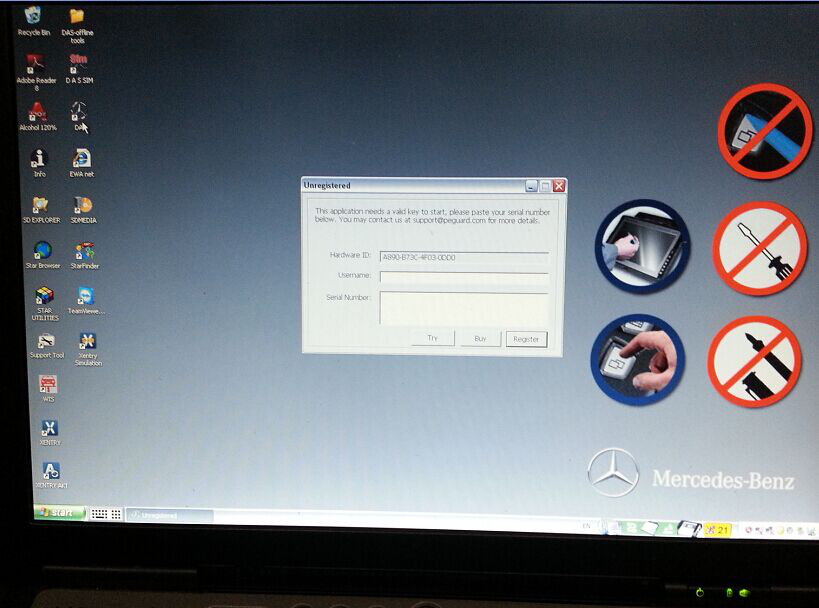
"Unregistered " issues window display like the above picture . So why will this issues happen ? There have 2 reasons and solutions as bellow :
1. It must didnt select the correct hard disk mode , you should choose ATA mode , how to do ?
Reboot your laptop , pressing F2 when start your laptop , enter into the bios system , click system configuration—》SATA operation—》 choose ATA , then will be ok .
2. You must be have copy the software from our original hard disk to the new hard disk , we'd like to say that our software cant copy , otherwise the software cant work .
Any other problem , welcome to contact us any time
Thank you
Join our community: |
 |
 |
 |
 |
 |
