What is Scanica SDP3?
Scania SDP3 is a PC-based diagnostics application software for Scania trucks, bus chassis and Scania engines. The Scania SDP3 application includes fault code reading, assisted trouble shooting, parameter settings and more. SDP3 shall be installed on a PC/Windows platform, and connect to the vehicle through a vehicle communication interface (VCI).

Why Choose Scanica SDP3?
Today’s vehicles and especially today’s electrical systems with their control units and distributed functions place greater demands on tools and technicians. It is both time-consuming and complicated to carry out troubleshooting on vehicles of such complexity. SDP3 has therefore been designed to support the mechanic during troubleshooting and thus reduce downtime.
SDP3 also supports the troubleshooting of industrial and marine engines.An advantage of SDP3 is that there are more possibilities than before for the individual item, i.e. the vehicle or engine to which you are connected, to give a description of itself. SDP3 makes use of this and only displays information relevant to the vehicle/engine to which it is connected.
Scania SDP3 Software Function List:
Check and adjustments
Conversion
Maintenance
Campaign
Bodywork
Fault Codes
Fault Reporting
Programming of Control units
Scania SDP3 supported modification of ECU data
EMS – Engine management system.
GMS – Gearbox management system.
RET – Retarder system.
AWD – All wheel drive system.
CLS – Clutch Control.
EEC – Exhaust Emission Control.
COO (COO7) – Coordinator.
BWS (BCI1) – Bodywork system.
Scania SDP3 supported resolving trouble codes to text description:
EMS (S6, S7, S8).
GMS (OPC4, OPC5).
RET (RET1, RET2).
AWD (AWD1).
EEC (SCR1, EEC3).
COO (COO6, COO7).
HMS (HMS1).
Scania SDP3 interesting options:
AdBlue ON/OFF.
EGR ON/OFF.
Chassis ID/VIN Change.
Immobilizer ON/OFF.
Truck Power INCREASE.
ECU Recovery.
ECU Reset.
ECU Unlock.
Scania SDP3 Support Language:
English, German, Spanish, French, Japanese, Dutch, Persian, Polish, Portuguese, Swedish, Norwegian, Suomi, Turkish, Italian, Czech, Russian, Chinese.
Scania SDP Installation Requirement:
Support Win7 64 bit system.WIN 10 32bit WIN10 64 bit (Tested by individual, so try on your own risk).
Need Netframework 4.5 installed on system. windows 7 or 8 will be better.
In order to install SDP3, administrator rights are required.
Note: The USB key and VCI must not be connected to the computer during the installation of SDP3, especially if SDP3 is not installed for the first time.
Free download Scania SDP3 2.46.1
1.Mega link:
https://mega.nz/file/a1BQHJRK#ydE4TiWWThdiRmhJqoG3WaG4tZUw0azejWm-8YklVI4
No password! (Security unknown)
Size: 893.5 MB
Chinese weiyun link:
https://share.weiyun.com/PdSLugZp
Password: 6u56j6
Size: 1005.28 MB
Heavy duty scanner Scania Diagnos & Programmer 3 Version 2.46.1 Update Feature:
New general features
No major new general features in the issue.
New system-specific features
New user function warns of open door
The cab door open warning is a new user function for all trucks in the P, G, R and T series.
The UF1157 user function warns if any of the cab doors are open. This is because there is a potential safety risk to people inside and outside the vehicle if a cab door is open.
The new function can be found under User functions > Driver warning >UF1157 Cab door open warning.
Systems affected by the new function are ICL3, COO8 and DCS1.
New parameter for gas vehicles
A new parameter has been created for gas vehicles, Over-acceleration protection bypass.
The parameter can be found under Electrical system > Engine management system > EMO2 > adjustment.
The new parameter applies to vehicles with power take-offs and has self-regulating software.
System-specific changes
Revised text in installation test
Changes to the menu option text in the installation test have been introduced in the function wizard Installation test for industrial engines.
Systems affected are EMS/EME1. More specifically, this applies to StageV industrial engines.
The menu option Excessive nitrogen oxide levels in the exhaust gases has been renamed and is now called: Emission-related faults (MIL).
The change has been introduced to make the text more consistent with the text in the installation manual.SDP3 certificate
Handling of SDP3 certificates will change from 1 November.
In connection with this, the certificate needs to be reinstalled. For this reason, a new version (v14) of the document Certificate for services in SDP3 is available for download from Scania Technical Information Library.
The change applies to all use of services in SDP3.
Addition to information about compression tests
An addition has been made to the information about the requirements that must be satisfied in order to run the compression test on Scania
Engines engines with S8 and EME1, included in the EMS system.
The text that has been added is CAN communication between starter motor and engine control unit must be active.
Facilitated troubleshooting of the charge air pressure system
Five signals have been added to the signal list for OCS1. The signals are under Signal logging, OCS1.
The signals have been added to facilitate troubleshooting of the charge air pressure system.
The signals that have been added are:
• Adaptive correction of charge air pressure 0-1,200 rpm
• Adaptive correction of charge air pressure 1,200-1,400 rpm
• Adaptive correction of charge air pressure 1,400-1,600 rpm
• Adaptive correction of charge air pressure 1,600-1,800 rpm
• Adaptive correction of charge air pressure, over 1,800 rpm
The affected products are trucks and buses that run on gas, both NGS and NCG.
Need Netframework 4.6 or up version installed on system.(After installation,need restart your pc)
In order to install SDP3, administrator rights are required.
How to Install SDP3 V2.46.1 on Windows 7
1.Copy and paste Scania SDP3 2.46.1 software folder to desktop
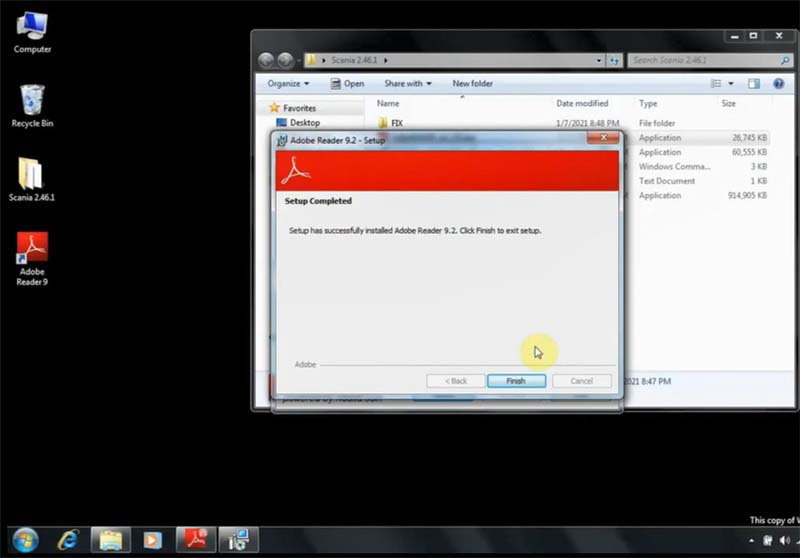
2.Install Adobe Reader 9.2
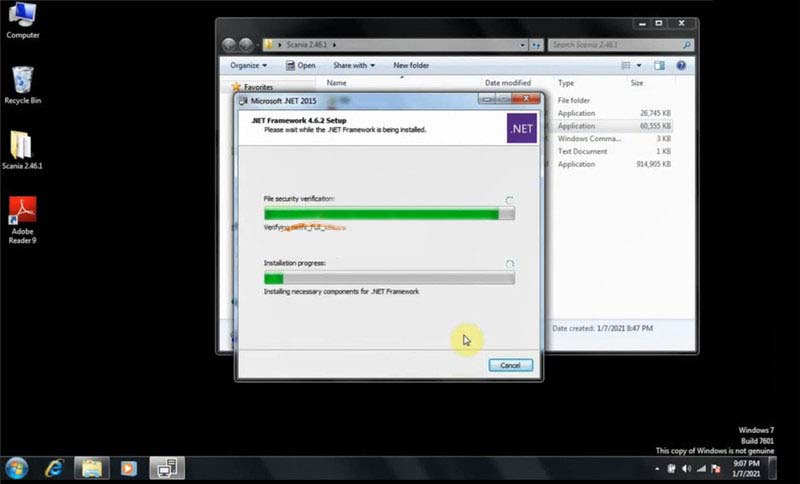
3.Run NDP462 setup as administrator and install Framework 4.6.2 setup
4.Run Scania Diagnos & Programmer3 2.46.1.exe as administrator to install setup
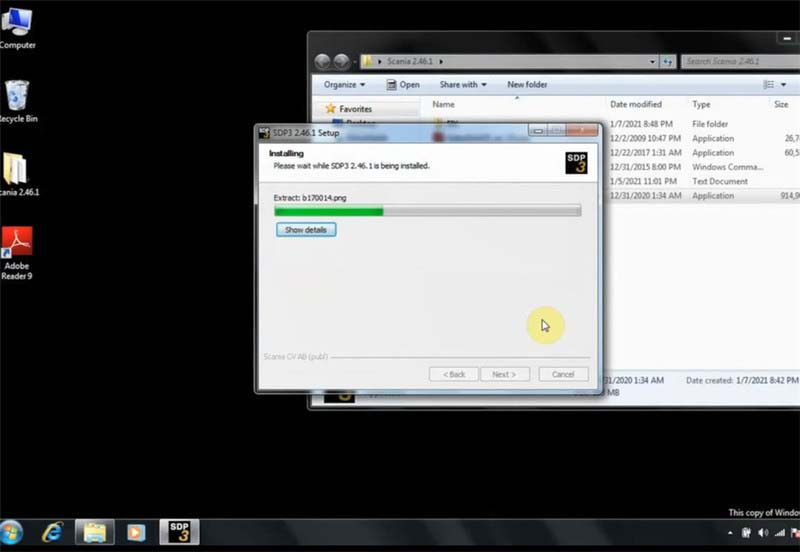
Note: Make sure the VCI unit and SDP3 USB key are disconnected from the computer before continuing with this installation.
5.Run Prerequistes.cmd as administrator to check operation is completed

6.Restart computer
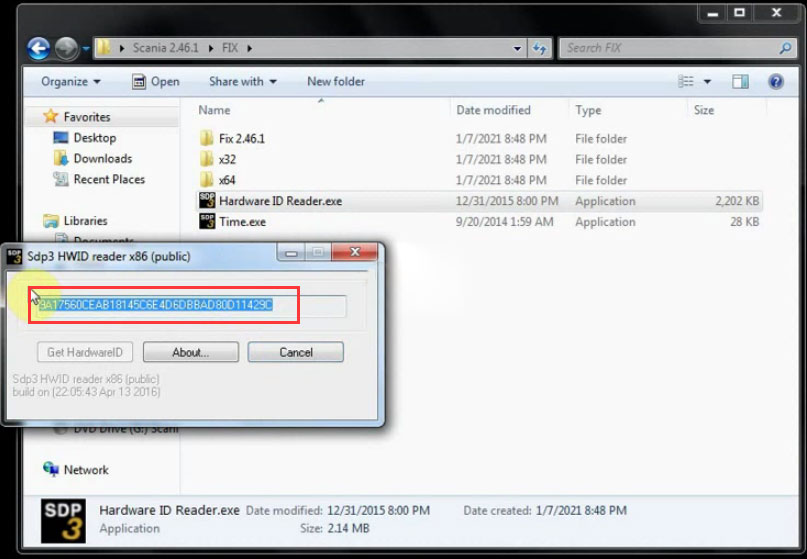
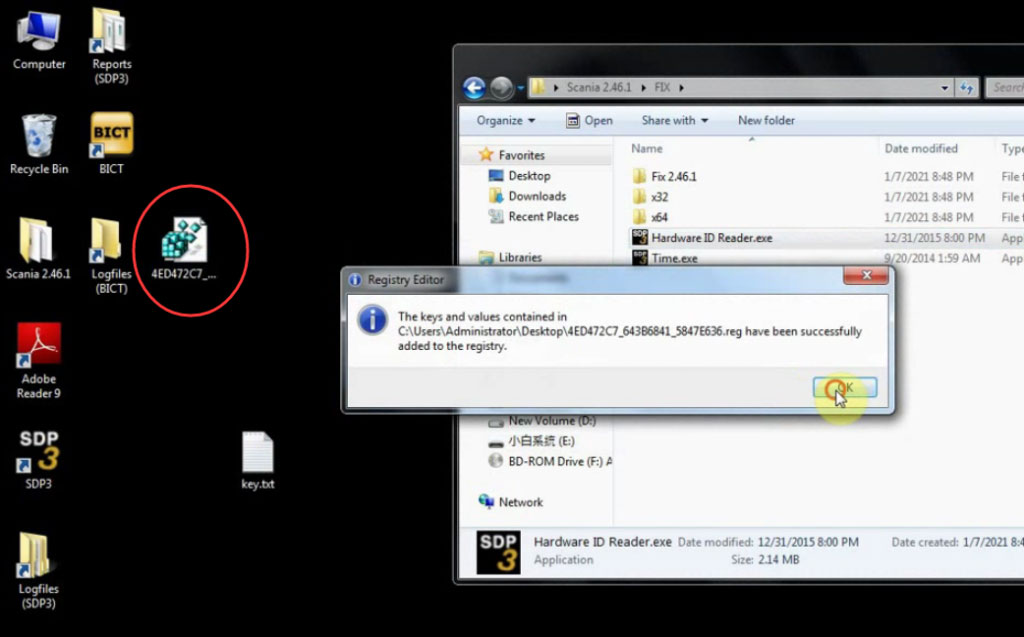
7.Open software folder and FIX file to run Hardware ID Reader.exe
Copy and paste the ID to eobdtool.co.uk engineer to get activation ID
Merge registration key
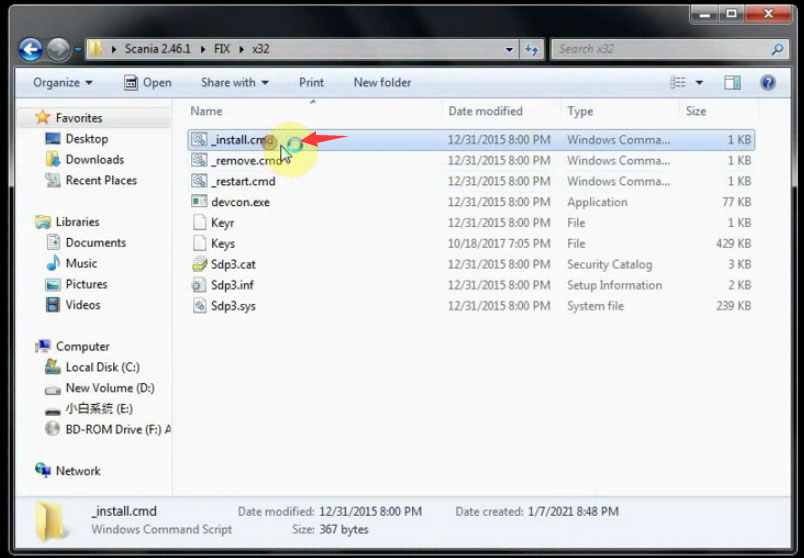
8.Open -install_cmd file on C:/Scania 2.46.1/FIX/x32
Note: It depends on the operating system.
9.Connect Scania VCI3 interface with computer
Install device driver software
Once the device driver software has been installed successfully, it will show the related message at the bottom right of the screen.
10.Restart computer
11.Copy 2 files in C:/Scania 2.46.1/FIX/Fix 2.46.1 and replace that in C:/Program Files/Scania/SDP3 folder

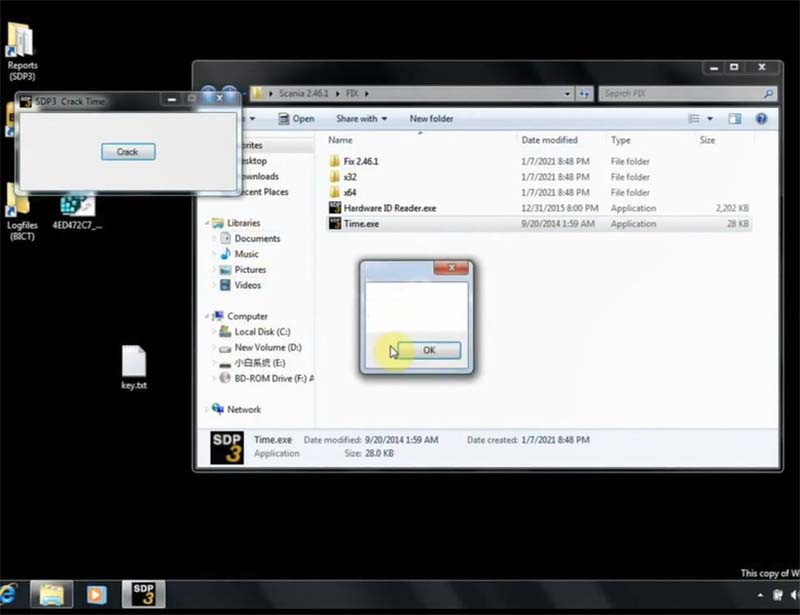
11.Run Time.exe in FIX folder as administrator
Crack SDP3 time
12.Restart computer
13.Run SDP3 software on desktop
Follow the prompt to update VCI until the process is done

14.Open SDP3 Configurator on desktop to select language you desired

15.Now the software is ready to use, you can do any function supported.
