Welcome everyone! Today I will walk you through my recent experience troubleshooting my 2003 Jaguar S-Type R (4.2L V8 Supercharged). The car displayed a “Limited Performance” warning and I decided to properly diagnose the problem rather than blindly replace parts.
Jaguar Diagnostic System (SDD) and Older IDS Software
After some research, I discovered that Jaguar’s official diagnostic tool, Symptom Driven Diagnostics (SDD), includes an older version of software called “Integrated Diagnostic Software (IDS)” that is compatible with my 2003 model.
To use this system, I purchased a JLR Mongoose diagnostic cable, which connects via USB to a Lenovo ThinkPad running Windows 10 Enterprise. To get the old IDS software working, I set up VMware Workstation 16, which includes a Windows XP virtual machine pre-configured with the Jaguar Land Rover SDD software.

Setting up the diagnostic system
1. Connect the JLR Mongoose cable
– The cable plugs into the car’s OBD-II port and connects to the laptop via USB.
– In the virtual machine, the Mongoose Pro JLR device is immediately recognized.
2. Launch the IDS software
– Since my vehicle is older than 2005, I had to enter the VIN manually instead of using auto-detect.
– Once connected, IDS confirms compatibility and launches its diagnostic interface.
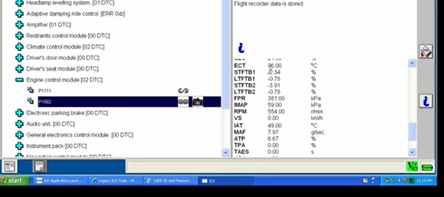
Performing diagnostics
– Ignition position 2: Make sure the car is in the correct ignition position for proper communication.
– Battery Notes: Since location 2 powers multiple systems, I recommend using a trickle charger if the vehicle is not driven frequently.
– Reading Diagnostic Trouble Codes (DTCs): The IDS scanned the system and returned multiple codes.
Analysis Results
– Engine Codes:
– P1111: Expected code, indicating a successful system check.
– P1582: Flight recorder data recorded during the last issue.
– Fuel Trim Data: Readings are within acceptable range (less than 25%).
– Mass Air Flow (MAF) Sensor:
– Low readings and untrustworthy air temperature values detected.
– MAF sensor fault confirmed.
– All issues resolved after replacing the MAF sensor.
– Other Modules:
– No errors in the Transmission Control Module (TCM).
– Communication faults detected in the Adaptive Damping Ride Control and Amplifier, but these are not serious and may be due to the age of the car.
Additional Features in IDS
– Configuration and Dealer Options
– Allows for changes to security settings, auto-locking, and comfort features.
– Enables module replacement and reprogramming.
Summary
Using IDS provides greater insight than using a generic OBD-II scanner. It helps pinpoint the problem rather than relying on assumptions or replacing parts unnecessarily. If you have an older Jaguar, I highly recommend purchasing the JLR Mongoose cable and IDS software.
In a future article, I plan to explore SDD on my 2006 Jaguar XJ TDVi Sovereign Diesel, showing how the new system compares to IDS.
I hope you find this guide helpful—stay tuned for more diagnostic content!
