What’s the MB STAR SD Connect Compact C4 C5 User Name and Password
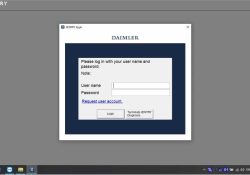
Many customers contacted us for User name and Password about MB STAR SD Connect Compact C4 C5, like the picture showing: Our mb star c4 c5 can support online and offline function. When you choose offline function,pls try User name:… Continue Reading →

Username and password for Xentry,EWA of MB SD Connect C4 C5 Engineering Software

When you run Xentry software,you will be asked to put username and password.What is it? Username:xentry Password:123456 But pls note that it is for offline function.If you want to support online function,you must have an account online from Benz dealer.… Continue Reading →

Benz Xentry VCI factory setting

For some reasons you need reset your Benz Xentry VCI to factory setting.Here is a instruction show you guide on how to initialize your Benz Xentry VCI to factory settings. Related Content: Benz Xentry OpenShell.XDOS 2022 Free Download If required,… Continue Reading →

MB STAR SD Connect C4 C5 Super Engineering Software

Now the MB STAR SD Connect C4 C5 Super Engineering Software version is 2022.12. MB STAR SD C4/C5 Software Descriptions : 1.Including Super Engineer Software:DTS monaco V8.16.15 And Vediamo V5.01.01 Support Offline Programming 2.Support Wireless 3.Software Version: V2022.12 4.Support Multi-Language: (Default language… Continue Reading →

How to set Bios to ACHI for C4 or C5

Recently some buyer ordered the MB STAR C4 C5 With Doip from us,and they told us when they use 2 or 3 hours then crashed, could not work any more.Our engineer said need set the Bios to ACHI. If you… Continue Reading →

How to connect with wifi for the C4 C5

So many customer told us that they could not connect with the wifi ( No wlan)? how to solve this problem, please check as following: Please note, the No wlan is not wifi can not be used. Please connect the… Continue Reading →

First time to activate mb sd c4 steps

First time to activate mb sd c4 steps Open your Star Set you com port to Com2 , 115200   X X Open the EPC_Net User : admin passwd: 12345 Click “Server” Click “Edit the access authorization” Send us the… Continue Reading →

Solution for MB SD C3 C4 C5 Error code 204

Error: If your Mb SD C4 has the problem of DCDI-eErrorCode=204 as below, please follow our solution This error comes up, it means the hardware procedure has been deleted, so you can’t set the WIFI or SDC4 ID Solution: Update… Continue Reading →

How can i get the Wifi for C5 and let EVG7 work with XENTRY 

MB SD Connect Compact 5 Star C5 Diagnostic Tool With DOIP And WiFi 2022.09 Plus EVG7 Diagnostic Controller Tablet PC MB SD Connect C5 DoIP MB Star Diagnostic Tool Support DOIP function for Benz car commander online programming. MB SD Connect… Continue Reading →

C4 C5 Software 2022.09 Update

Benz software 2022.09 special function version (Win10 x64 version ) Xentry DAS 2022.09, Support bus and truck testing, support 213, 257 and so on new model cars to free Login diagnosis,support the older cars 140 and so on other model… Continue Reading →

How to configure Super MB Pro M6 Wifi on Win10 Win7 XP

Here takes Super MB Pro M6 wireless as an example Connect the device with PC Find the WiFi (WiFi name: XC4 PLUS_****) Click ‘Connect’ Enter the network security key (password): 123456789 Then click ‘Next’ It will prompt ‘Do you want… Continue Reading →