What is New Holland Electronic Service Tool?
Electronic Service Tool (EST) Engineering Level* (software only) – used by New Holland dealer technicians to connect with vehicles that have a Controller Area Network (CAN) BUS. CNH Electronic Service Tool 9.12 Diagnostic Software (EST) with Engineering Level* (available for download) – used by New Holland dealer technicians to connect with vehicles that have a Controller Area Network (CAN) BUS.
The new version of New Holland CNH EST works with OS Windows 10 64-bit and Windows 11 64-bit PRO, except the Home edition).
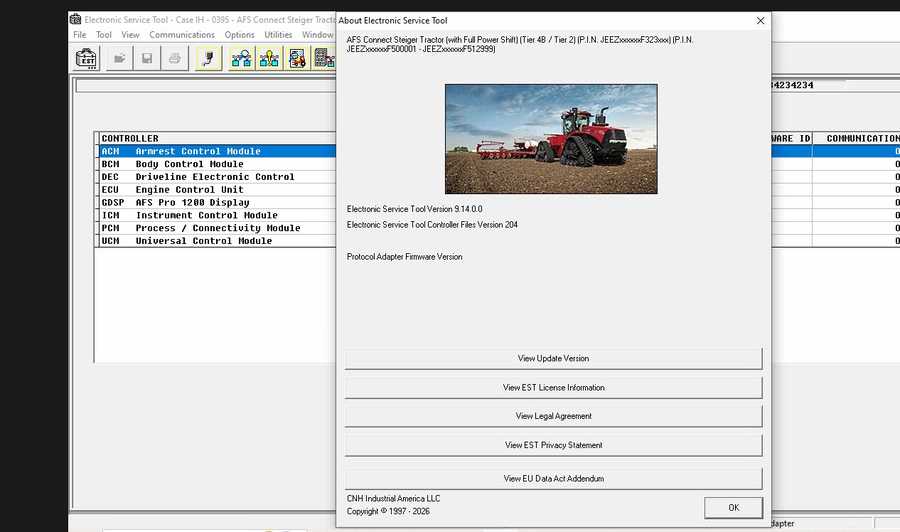
New Holland Electronic Service Tool Function List:
Check the status of parameters;
• Retrieve faults;
• Run diagnostic tests;
• Make ECU and parameter programming;
• Monitor active and logged diagnostics;
• View and change ECU configuration;
• View diagnostic procedures and schematics.
• Troubleshoot problems;
• Use assist database;
• Run scope diagnostics;
New Holland Electronic Service Tool Support OS:
Windows 7 32 bit, Windows 7 64 bit, Windows 8/8.1 32 bit, Windows 8/8.1 64 bit, Windows 10 32 bit, Windows 10 64 bit
New Holland Electronic Service Tool Support Languages:
English, Spanish, Italian, Mexican, German, Norwegian, Russian, French
New Holland Electronic Service Tool Supported Brands:
New Holland (Agriculture and Construction);
New Holland FK (Fi at-Kobelco);
New Holland O&K (Orenstein & Koppel);
CASE (Agriculture and Construction);
STEYR;
KOBE-LCO;
Iveco (Astra) (articulated dump trucks only);
Flexi-Coil;
Sumitomo (S.H.I.)
CNH EST Software Download
New Holland Electronic Service Tool 9.1 Download:
https://mega.nz/#F!WVghzKwY!anc22uzd2t41QLiGgAt88Q
New Holland Electronic Service Tools 9.2(CNH EST 9.2) software
https://mega.nz/#F!2UpnhLSL!b7ptTfnUtQzjRdcef2_z3Q
New Holland Electronic Service Tools 9.14 100% Work
https://www.cnautotool.com/goods-7312-CNH-EST-Diagnostic-Software-and-ETimGo-OFFLINE-Repair-Manual.html
CNH EST 9.14 + ETimGo Full 8.21 2025 Install + Active
Type of software: Repair manual, Diagnostic Software
Make: Case, Kobelco, New Holland
Region: WorldWide
OS: Window 10 64bit
Electronic Service Tool Software CNH EST 9.14 Supported brands:
New Holland (Agriculture and Construction);
New Holland FK (Fi at-Kobelco);
New Holland O&K (Orenstein & Koppel);
CASE (Agriculture and Construction);
STEYR;
KOBELCO;
Iveco (Astra) (articulated dump trucks only);
FlexiCoil;
Sumitomo (S.H.I.)

The software EST v9.13 comes as:
- CNH EST 9.10.0.0.1 installation file,
- CNH EST 9.10.0.0.2 (EST91000Up1) update,
- CNH EST 9.10.0.0.3 (EST91000Up2) update,
- Controller Package v140 (04/2024),
- EASY Software installation package v18.1.1.0 (E.A.S.y – additional engine diagnostic and download tool for connection directly to ECU to perform diagnostic, programming and ECU reload by K-Line protocol),
- New Legacy Diagnostics database for Troubleshooting,
- Activation for a single computer
- Teamviewer remote assistance with setup & activation
The software EST v9.9 comes as:
- CNH EST 9.9.0.0.1 installation file,
- CNH EST 9.9.0.0.2 (EST9900Up1) update,
- CNH EST 9.9.0.0.3 (EST9900Up2) update,
- CNH EST 9.9.0.0.4 (EST9900Up3) update,
- Controller Package v130 (01/2024),
- EASY Software installation package v18.1.1.0 (E.A.S.y – additional engine diagnostic and download tool for connection directly to ECU to perform diagnostic, programming and ECU reload by K-Line protocol),
- New Legacy Diagnostics database for Troubleshooting,
- Activation for a single computer
- Teamviewer remote assistance with setup & activation
The CNH DPA5 Kit Diagnostic Interface is NOT included.
The software EST v9.8 comes as:
CNH EST 9.8.0.0.0 installation file,
CNH EST 9.8.0.0.2 (EST9800Up1) update,
CNH EST 9.8.0.0.3 (EST9800Up2) update,
CNH EST 9.8.0.0.4 (EST9800Up3) update,
CNH EST 9.8.0.0.5 (EST9800Up4) update,
CNH EST 9.8.0.0.6 (EST9800Up5) update,
CNH EST 9.8.0.0.7 (EST9800Up6) update
Controller Package v113 (09/2023),
EASY Software installation package (E.A.S.y – additional engine diagnostic and download tool for connection directly to ECU to perform diagnostic, programming and ECU reload by K-Line protocol),
New Legacy Diagnostics database for Troubleshooting,
PC locked activation
Teamviewer remote assistance with setup & activation
Optionally, you can purchase eTimGo for CNH EST 02.2024 for all brands OFFLINE, which is a completely offline repair and diagnostics information database, with PIN search support.
NOTE: EST 9.3.0.0 will timeout on July 31st, 2021. All support for Windows 7 and 8.x will be closed.
EST 9.8.0.0 New Features
– EST PC Operating System (OS) and hardware requirements
Minimum Specifications:
Processor:
Intel Core i5 6th gen Processor or higher (Laptop must be manufactured in last 5 years)
RAM Memory:
8 GB or greater
Operating System:
Windows OS: Windows 10 64-bit or Windows 11 64-bit
Hard Drive:
250 GB or greater – Solid State Drive (SSD) is recommended for improved performance
Ports:
One 9-pin Serial port (preferred) OR USB to RS-232 Converter – FTDI Chipset) 380003514
USB to RS232 adapter
Two USB ports • Ethernet port
WiFi 802.11b / g • Bluetooth • Mobile Wireless – Recommended
– Vehicle PIN Management
– Diagnostic Tool Manager (DTM)
– PRO 700 Plus / IntelliView IV Plus display support
– Engine download request faults update
– DATAR updates
– New Equipment selections in EST
– Straight Tracking Calibration
EST 9.7.0.0 New Features
The release of the Electronic Service Tool (EST) 9.7.0.0 and the new eTIM software includes several improvements to the service tool software. These changes include:
– EST PC Operating System (OS) and hardware requirements
– Windows 11 support
– EST Software Installation and licensing
– DPA5 Hardware and Firmware updates
– EASy ECU programming crashing
– New Models in EST9700
The software EST v9.7 comes as:
CNH EST 9.7.0.0.0 installation file,
CNH EST 9.7.0.0.2 (EST9700Up1) update,
CNH EST 9.7.0.0.3 (EST9700Up2) update,
CNH EST 9.7.0.0.4 (EST9700Up3) update,
CNH EST 9.7.0.0.5 (EST9700Up4) update,
Controller Package v91 (01/2023),
EASY Software installation package,
New Legacy Diagnostics database for Troubleshooting,
PC locked activation
Teamviewer remote assistance with setup & activation
The software EST v9.6 comes as:
CNH EST 9.6.0.0.0 installation file,
CNH EST 9.6.0.0.2 (EST9400Up1) update,
CNH EST 9.6.0.0.3 (EST9400Up2) update,
CNH EST 9.6.0.0.4 (EST9400Up3) update,
CNH EST 9.6.0.0.5 (EST9400Up4) update,
CNH EST 9.6.0.0.6 (EST9400Up5) update,
CNH EST 9.6.0.0.7 (EST9400Up6) update,
CNH EST 9.6.0.0.8 (EST9400Up7) update,
CNH EST 9.6.0.0.9 (EST9400Up8) update,
CNH EST 9.6.0.0.10 (EST9400Up9) update,
CNH EST 9.6.0.0.11 (EST9400Up10) update,
CNH EST 9.6.0.0.12 (EST9400Up11) update,
Controller Package v78 (08/2022),
EASY Software installation package,
New Legacy Diagnostics database for Troubleshooting,
PC locked activation
Teamviewer remote assistance with setup & activation
What’s new with EST 9.6.0.0
EST 9.6.0.0 New Features
The release of the Electronic Service Tool (EST) 9.6.0.0 includes several improvements to the service tool software. These changes include:
– EST PC Operating System (OS) and hardware requirements
Minimum Specifications:
Processor:
Intel Core i5 6th Gen Processor or higher (Manufactured in 2015 or later)
RAM Memory:
8 GB or greater
Operating System:
Windows OS: Windows 10 64-bit Note: A 64-bit operating system is mandatory
Hard Drive:
250 GB or greater – Solid State Drive (SSD) is recommended for improved performance
Ports required for adapter connection:
One 9 pin Serial port (preferred) OR USB to RS-232 Converter – (FTDI Chipset) 380003514 – USB to RS232 adapter
– New diagnostic adapter support
The EST9600 base software introduces support for a new diagnostic adapter to interface with CNHi equipment.
EST9600 will support both the DPA5 and CoreXS and allow for easy conversion between these two diagnostic adapters.
To view the connector selection with EST9600, click Communications in the top ribbon.
In the dropdown menu, hover over the Communications Adapter Selection.
– Legacy Diagnostics download and installation
The new legacy troubleshooting database is released and will be available with the EST9600 software.
What’s new with EST 9.5.0.0
The release of the Electronic Service Tool (EST) 9.5.0.0 and new eTIM software includes several improvements to increase the ability of the user to service and diagnose equipment. These changes include:
– EST PC OS and hardware requirements
– EST Software Installation
– Equipment Auto-Detection Support
– EASy Software Management
– EASy Injector Cutout Test Improvements
The software EST v9.5 comes as:
CNH EST 9.5.0.0.0 installation file,
CNH EST 9.5.0.0.2 (EST9400Up1) update,
CNH EST 9.5.0.0.3 (EST9400Up2) update,
CNH EST 9.5.0.0.4 (EST9400Up3) update,
CNH EST 9.5.0.0.5 (EST9400Up4) update,
CNH EST 9.5.0.0.6 (EST9400Up5) update,
CNH EST 9.5.0.0.7 (EST9400Up6) update,
CNHSupportUpdate_27790_3_2_10,
EasyNETMainProgram_27787_10_18_1,
ECM_MD1CS069_DA_FPT_27696_0_45_7,
EDC16C39_P_CNH_1_3_SETUP_28684_1_10_1,
EDC17CV41_CAN_D_CNH_Setup_29247_0_16_1,
EDC17CV41_DA_CNH_28427_1_4_6,
EDC17CV41_VECTOR_DatiMemorizzatiMuda_IV_setup_23505_1_19_6,
MD1_ET_28410_0_3_1,
MD1CS069_DatiMemorizzati_setup_27994_1_2_4,
MD1CS069_DB_27950_0_2_1,
MD1CS069_DB_28493_0_4_7,
16.1.1.0
EST Legacy Diagnostics package,
Vehicle Controller Files v67 (03/2022 date of update)
PC locked activation
Teamviewer remote assistance with setup & activation
The software EST v9.4 comes as:
CNH EST 9.4.0.0.0 installation file,
CNH EST 9.4.0.0.2 (EST9400Up1) update,
CNH EST 9.4.0.0.3 (EST9400Up2) update,
CNH EST 9.4.0.0.4 (EST9400Up3) update,
CNH EST 9.4.0.0.5 (EST9400Up4) update,
Vehicle Controller Files v46,
Legacy Multilanguage Diagnostic Procedures installer,
Optionally, by request, with Additional assistant Programs,
PC Locked Activation tool with the engineering access level.
The software EST v9.3 comes as:
CNH EST 9.3.0.0.0 installation file,
CNH EST 9.3.0.0.2 – 9.3.0.0.7 (EST9300Up5) updates,
Legacy Multilanguage Diagnostic Procedures installer,
Optionally, by request, with Additional assistant Programs,
PC Locked Activation tool with the engineering access level.
New Holland Electronic Service Tool 9.2 Update:
Case IH AG:
-New Engine Datasets for the following Machines with FPT engines
oEDC17C49 Engine Controller Datasets
•5802804074 -FARMALL 55A (Tier 4A)
•5802804075 -FARMALL 65A (Tier 4A)
•5802804076 -FARMALL 75A (Tier 4A)
New Holland AG:
-New Engine Datasets for the following Machines with FPT engines
oEDC17C49 Engine Controller Datasets
•5802804074 -T4S.55 / WORKMASTER55 / T3.60F (Tier 4A)
•5802804075 -T4S.65 / WORKMASTER 65 / T3.70F (Tier 4A)
•5802804076 -T4S.75 / WORKMASTER 75 / T3.80F(Tier 4A)
Case CE Heavy:
-Wheel Loaders (Models 521G, 621G, 721G, 821G, 921G, 1021G, 1121G) (Tier 4B / Tier 2)
oColor Display-Vehicle Support (GDSP) software version 1.11.0.0; part number 51447685
New Holland CE Heavy:
-Wheel Loaders (Models W110D, W130D, W170D, W190D, W230D, W270D, W300D) (Stage V)
oColor Display-Vehicle Support (GDSP) software version 1.11.0.0; part number 51447685
New Holland CE Light:
-Wheel Loaders (Models W110D, W130D, W170D, W190D, W230D, W270D, W300D) (Stage V)
oColor Display-Vehicle Support (GDSP) software version 1.11.0.0; part number 51447685
