You should copy “ sultan “ counting device whole folder from CD to your laptop hard disk C , then running it . Maybe you will have 2 types problem as bellow :
1. ”sultan” counting device showed :”Cannot create file D:\Inline6_App\s.dll ” ( because its running from DVD )

2. “ sultan” counting device showed :” err code:2 “, its because you only copy the “ sultan “ counting device file to your C disk . You must need take whole files to your C disk .

Correct open the software

Remark :
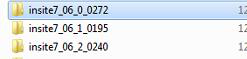
Installing steps :
Install “insite7_06_0_0272”select “insite7_06_1_0195”update ,then select “ insite7_06_2_0240”update . At last , you can active the software .
If you still dont know how to operate it , please check the video as bellow :
Cummins 7.6.2 active and installation video
