Scania SDP3 VCI3 truck diagnostic scan tool adds advanced WIFI wireless connection feature comparing with Scania VCI2.
Software version: SDP3 (Scania Diagnose & Programmer) V2.21
Connection: USB or WIFI wireless connection
How to setup Wifi wireless connection of Scania SDP3 VCI 3?
Well install SDP3 software
Connect the Scania VCI 3 scanner interface module with vehicle via OBD diagnostic socket
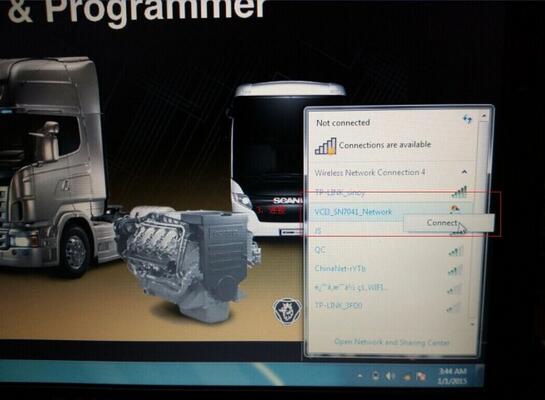
1) Turn on the computer WIFI
2) Find out the VCI3 Network option

Click “Connect”
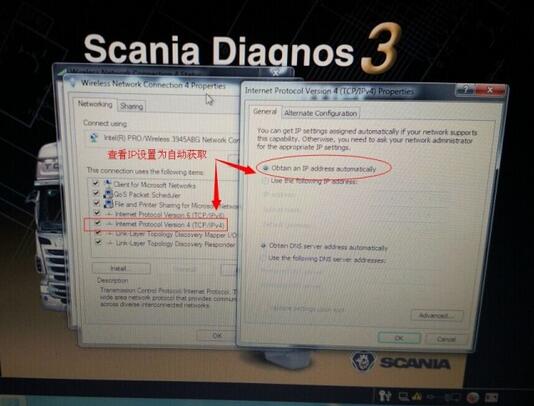
Go to Network settings, right click “Properties”, set the IP to “Internet Protocol Version 4 (TCP/IPv4)” and then choose “Obtain an IP address automatically”
Click “Connection” tab of SDP3 software, select “Connect to wireless VCI”

Select a VCI to connect to. Click “Connect”
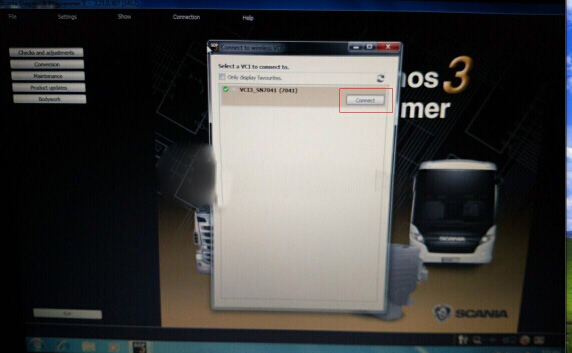
The WIFI wireless connection setting is done. Check the connection status on the button of the program.

FacebookTwitterLinkedInfavicon – How to setup WIFI wireless connection of Scania SDP3 VCI3? – How to setup WIFI wireless connection of Scania SDP3 VCI3?
