When you use BMW ICOM A+B+C diagnostic head with ICOM ISTA-P/D software, but the IP address cannot be found, how to solve this problem?
Here is the suggestion from a professional technician working at www.cnautotool.com.
If you have the same problem, you can try to set ICOM WLAN.
Step 1: Open Itool Radar to identify the BMW ICOM info

Step 2: Acess the ICOM configuration url through IE
Here take an IP address the subject to the actual reading.
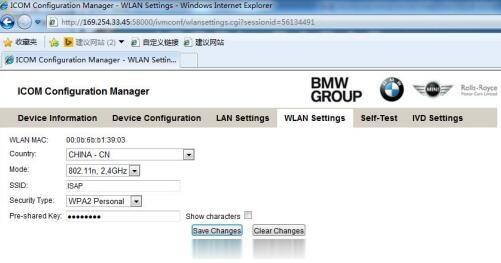
Step 3: Select WLAN Settings and enter the corresponding available WiFi info
Confirm the info entered and click Save Changes to save
Step 4: Disconnect the network cable and power supply, then restart ICOM
Wifi will be connected automatically when starting ICOM
Note: If you use our sotware and USB- WiFi, the ICOM configuration info is:
Mode: 802.11n, 2.4GHz
SSID: ISAP
Security Type: WPA2 Personal
Pre-shared key: BmwAp24h
