Name Plate on Caterpillar Engine
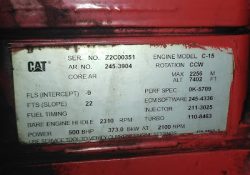
Name Plate on Caterpillar Engine (C-15) 115-5852-2 PLATE & FILM GP (ENGINE INFORMATION) Read More: Test the Connection to the ECM using CAT Communication Adapter 3 Toolkit Cylinder Cutout Test using Caterpillar ET Software Injector Solenoid Test using Caterpillar ET… Continue Reading
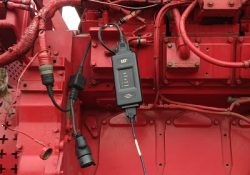
Test the Connection to the ECM using CAT Communication Adapter 3 Toolkit

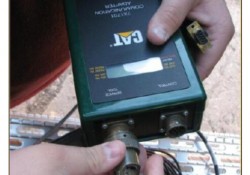
Test the Connection to the ECM Caterpillar Engines using CAT Communication Adapter 3 Toolkit Read More: How to Connecting Caterpillar ET Software to the ECM Use CAT Communication Adapter 3 Toolkit to test the connection between the CAT Communication Adapter… Continue Reading

Caterpillar ET 2020A (replaces CAT ET 2019C, 2019B) Electronic Technician Diagnostic Software

CAT Caterpillar ET 2020A (replaces CAT ET 2019C, 2019B) Electronic Technician Diagnostic Software Caterpillar electronic technician 2020A is an updated version of the caterpillar dealer diagnostic software. The Built-in Factory Password Generator The experimental feature allows you to decode (18-Bit… Continue Reading

Injection Disabled on Status Flags Caterpillar ET Software

“Injection Disabled” on Status Flags Caterpillar ET Software Read More: Cold Mode and No Engine Speed on Status Flags Caterpillar ET Software Create Product Status Report (Download List) on Caterpillar ET Software Diagnostic Codes on Caterpillar ET Software -If a… Continue Reading

CAT Factory Password Keygen & ET SIS STW License Key Generator Download

CAT Factory Password Keygen & ET SIS STW License Key Generator Download. After payment,you will get the download link and extract password on your payment page.And for how to use guide,please follow this instruction video guide: How to Install &… Continue Reading

How to Setup Caterpillar CAT ET Diagnostic Adapter 3,II,I (14)

Caterpillar Electronic Technician offers several options for communication hardware. Communication Adapters are service tools consisting of a portable hardware adapter and a software PC program designed to run under Microsoft? Windows?. MPSI Pro-Link is a portable computer diagnostic analyzer. Setup… Continue Reading

Change Units of Measure on CAT Messenger Display

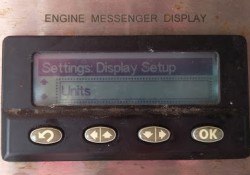
How to Change Units of Measure on Caterpillar ET Software Messenger Display? Units of Measure From the “DISPLAY CONFIGURATION” title screen, press the Down arrow button. This screen displays the current units for the measurements. Selecting the Display Units From the… Continue Reading

How to Solve the Problem NEXIQ-2 USB Link + Software can’t run keygen ?

NEXIQ-2 Support Heavy-Duty, Light-and Medium-Duty Trucks, CONSTRUCTION EQUIPMENT like (Wheel loader, Articulated Hauler and Excavator), Genset. Some customers have the problem that the software can’t run keygen , please check the pictures as bellow : Need to active : Cummins insite 7.5 : Pc… Continue Reading

Cold Mode and No Engine Speed on Status Flags Caterpillar ET Software

 “Cold Mode” and “No Engine Speed” on Status Flags Status Flags Read More: Diagnostic Codes on Caterpillar ET Software Create Product Status Report (Download List) on Caterpillar ET Software Cold Mode -The ECM limits engine power during cold mode operation… Continue Reading

How to Communication Hardware with Caterpillar Communication Adapter III

Configuring Cat Electronic Technician to use the Communication Adapter 3 For Cat Electronic Technician to work with the Communication Adapter 3, the settings must be changed to select the Communication Adapter 3 as the Communication Interface Device: Step 1 :… Continue Reading

Create Product Status Report (Download List) on Caterpillar ET Software

How to Create Product Status Report (Download List) on Caterpillar ET Software? Purpose: The Product Status Report feature allows users to capture the status of a machine or engine at a specific moment in time. Data loaded from the ECM… Continue Reading

Diagnostic Codes on Caterpillar ET Software

Diagnostic Capabilities Diagnostic Codes The engine’s Electronic Control Module (ECM) has the ability to monitor the circuitry between the ECM and the engine’s components. The ECM also has the ability to monitor the engine’s operating conditions. If the Caterpillar ET Software… Continue Reading

How to Connecting Caterpillar ET Software to the ECM

Caterpillar ET Software The Communications tab in the Preferences dialog box allows the communication interface device and the ports necessary to run the service tool to be set. NOTE: The information in the Communications tab is dependent upon the Communication… Continue Reading

Cat ET Service Software Deactivation

Instructions for the Deactivation of CAT ET and CAT SIS service software follow the same format. The examples that are shown in this presentation represent the Cat ET procedure. Please follow the same process for SIS DVD. Deactivation – Caterpillar ET… Continue Reading

CAT SIS 2018”Key Required”issues Solutions when Change the Computer

SIS is the electronic service tool that Caterpillar dealers, customers and employees rely on for their parts and service information needs. SIS provides information for all Caterpillar machines and engines from 1977. 1. After change the laptop , CAT SIS display… Continue Reading