CnAutotool has released a new Launch Thinkcar OBD2 full system auto diagnostic tool– THINKPLUS. What’s the difference from ThinkDiag? What’s new of Thinkplus? Is it worth purchasing?
Let’s start with the comparison.
Part 1: Launch ThinkDiag vs. Thinkplus:
| Item | Thinkdiag | Thinkplus |
| Image | 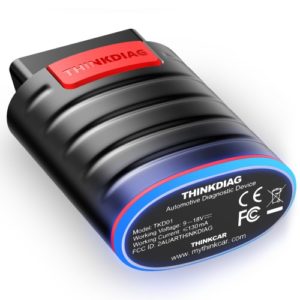 |
 |
| Reference price | €102.08 | €838.86 |
| Form | dongle+ App | hand-held device |
| Features | OBD II diagnostics; 15 maintenance reset functions; full system diagnostics; remote diagnostics(technician side); vehicle owner community; cost-effective professional diagnostics; support more than 110 vehicle brands; easy to carry and user friendly | OBD II diagnostics; full system diagnostics; professional artificial intelligent product; support more than 60 car manufactures |
| Positioning | professional intelligent diagnostic connector | quick scan detection tool |
| Usage | for professional diagnostics; maintenance reset | for quick diagnostics and generate a report |
| Customers | small and medium repair shops; technician and mechanic; DIYers | Industry users with automotive diagnostics needs |
| System | manufacturer level diagnosis; full system detection and diagnosis | support full system scan report |
| Protocol | compatible with all vehicles after 1996 support OBD II protocol: ISO 14230-4(KWP2000) ISO 15765-4(CAN) ISO9141-2(iso) ISO14229(uds) SAEJ1850(VPW&PWM) |
compatible with all vehicles after 1996 support OBD II protocol: ISO 14230-4(KWP2000) ISO 15765-4(CAN) ISO9141-2(iso) ISO14229(uds) SAEJ1850(VPW&PWM) |
In conclusion:
Although Thinkdiag and thinkplus both support OBD2 diagnosis, but Thinkplus tends to quickly diagnose and generate report.
Part 2: What’s Thinkplus?
Thinkcar Thinkplus is the first full-automatic vehicle quick diagnostic tool. It’s oriented to relevant industries such as fast repair service, second-hand car and automobile insurance. The greatest comparative advantage is to quick check, direct diagnostic report to users by email without any manual operations.
What’s the highlight of Thinkcar Thinkplus?
1.It can work once been plugged in, with no extra operations.
2.Generate diagnosis reports and send them to e-mail box automatically.
3.Full-system diagnosis and OBDⅡcan satisfy diagnosis requirements
There are there diagnostic modes to select:
-Full system diagnostic mode (data stream not included)
-Full system diagnostic mode (data stream included)
-OBD diagnostic mode
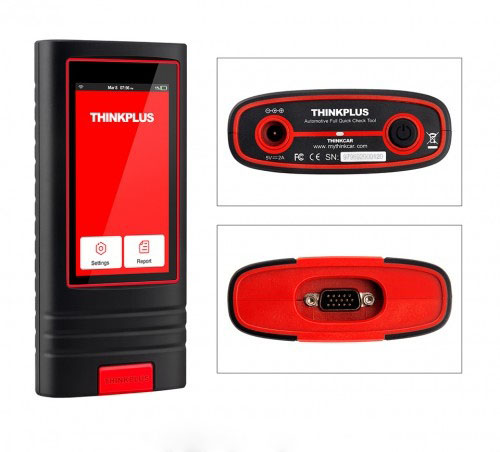

All the three modes can automatically send diagnostic reports by email.

4.Supports real-time voice broadcast of the current diagnosis system, thus you can know the diagnosis results without looking at the screen
5.Dust-proof, drop-resistance and durable
How to use Thinkplus OBD2 diagnostic tool?
It’s easy to operate. Just simply plug the Thinkplus device into the vehicle’s DLC (Data Link Connector) directly and then keep the vehicle ignition key on.
After diagnosis is completed, a diagnostic report will be generated on the ThinkPlus tool and sent to the registered email address automatically (if bound).
Learn more details about thinkplus, please refer to Thinkplus user manual.
https://mega.nz/file/GQtn2YQT#LRv3Bsuw8a-CYgxJsGaF-xGefErV3CcPXPSl9qT633k
